blendMatrix Node
transform scaling and matrix mixer
https://help.autodesk.com/cloudhelp/2020/ENU/Maya-Tech-Docs/Nodes/blendMatrix.html
earliest known version: 2020(? according to https://mayamel.tiddlyspot.com/)
intended use case
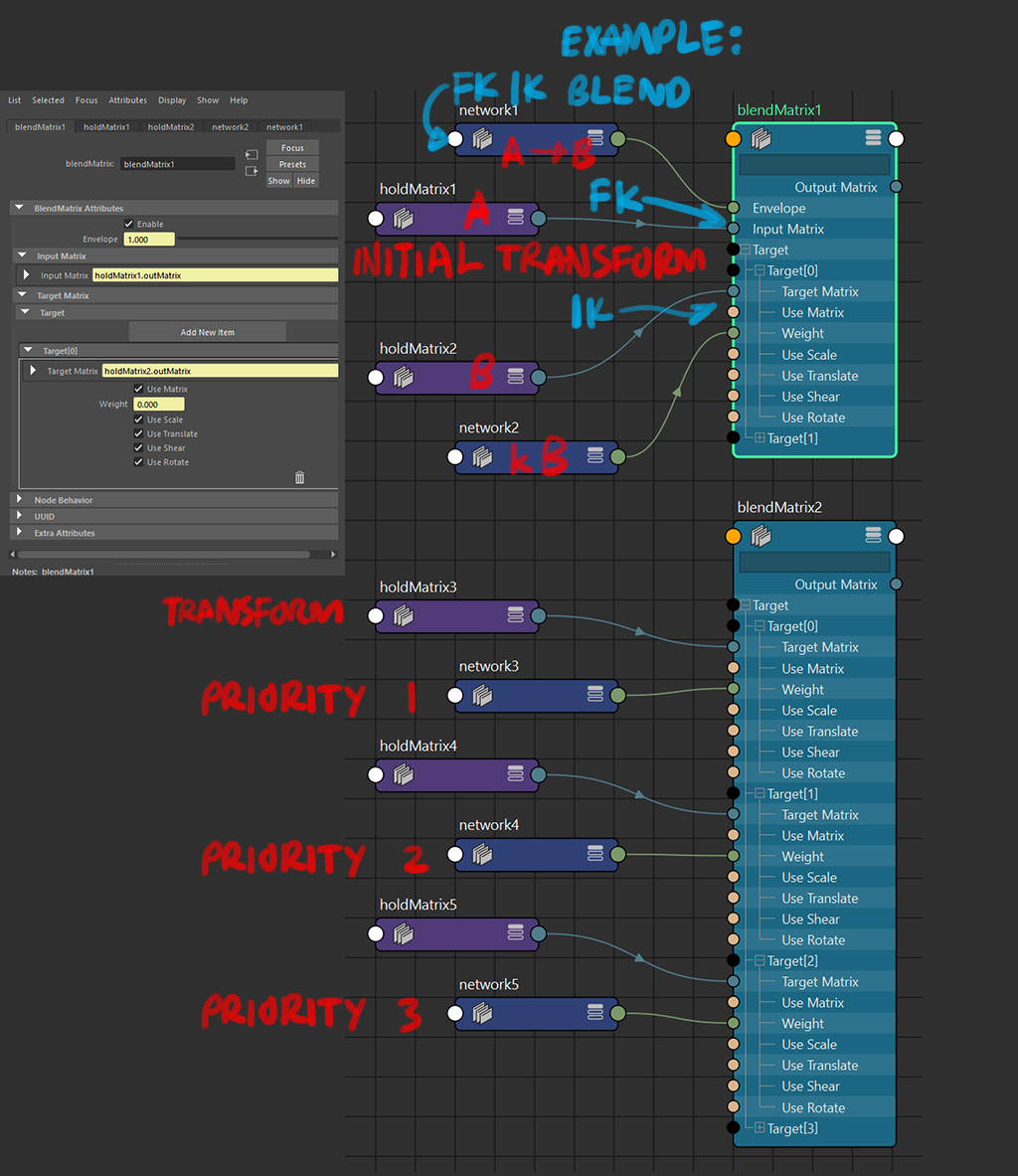
if there are multiple targets, the targetMatrix blends takes priority of the latest index.
inputTransform: A
targets: B,C,D,E,F,G

weight:  0,0,0,0,0,0
result transform: A

weight:  0,1,0,0,0,0
result transform: C

weight:  2,0,0,0,0,0
result transform: 2B

weight:  0,0,0,1,1,0
result transform: F, F only.

weight:  5,4,3,2,1,0
result transform: still just F
note on
translatecomponent of the transform:when a
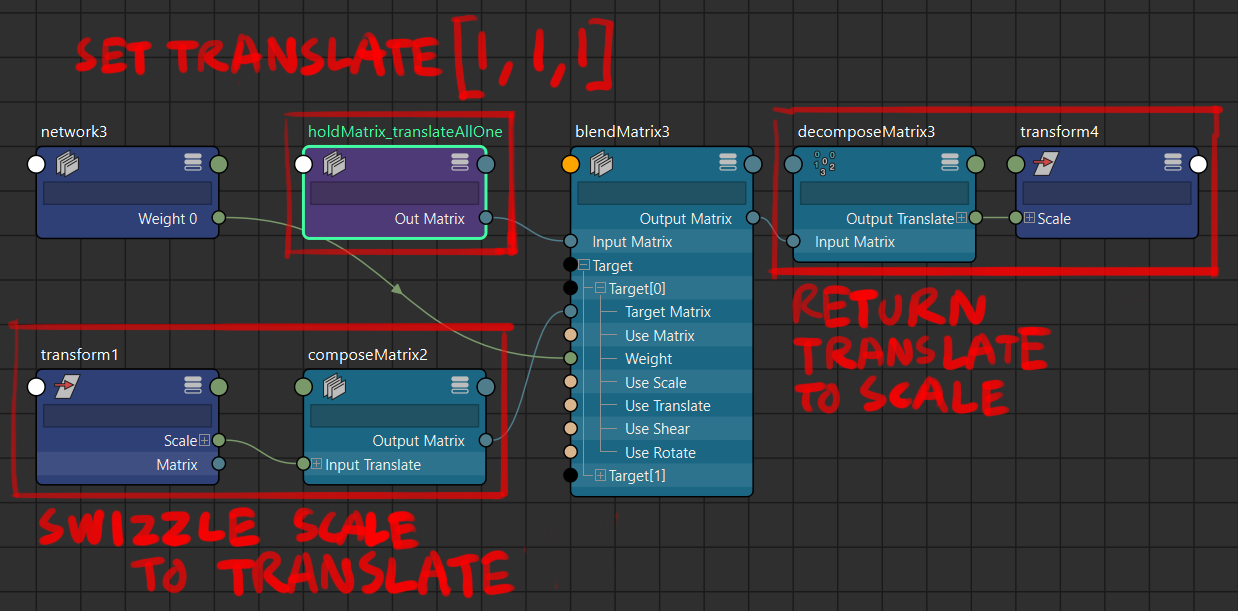
translateexists with arotateandscalein the transform matrix, the translate blending would follow the path affected by the rotation and scale transforms.depending on use case / if not desired, the way to avoid this is to pick the
translatepart of the transform (either in theblendMatrixnode itself for thetargetMatrix, or usingpickMatrixbefore connecting to theblendMatrixnode) and evaluate those separately in anotherblendMatrixbefore recombination.it’s less of an issue for rotation-only joints and animation baking/export, but it may be of concern if any object/system needs blending with transforms involving translation. the componentwise results are to be accumulated either with
composeMatrixor as a translate-rotate-scale multiplication withmultMatrix
note on
scalecomponent of the transform:when weight is
k, the input scale isAand the target scale isB, the result scale value isk(A-B)+A, which is the difference inscalevalues that is being (k)scaled up.also a negative scale result for the scale component (except scale.z) induces a flip in rotation due to matrix maths. consider clamping the minimum values leading to the weight attributes
if it is an absolute must for negative scale to persist, this is one workaround:
Maya 2024 continuity: or use 3lerpnodes forscale.xyz, don’t forget to setinput1as1
————————————————————————————————
multiple-channel transform blending mixer
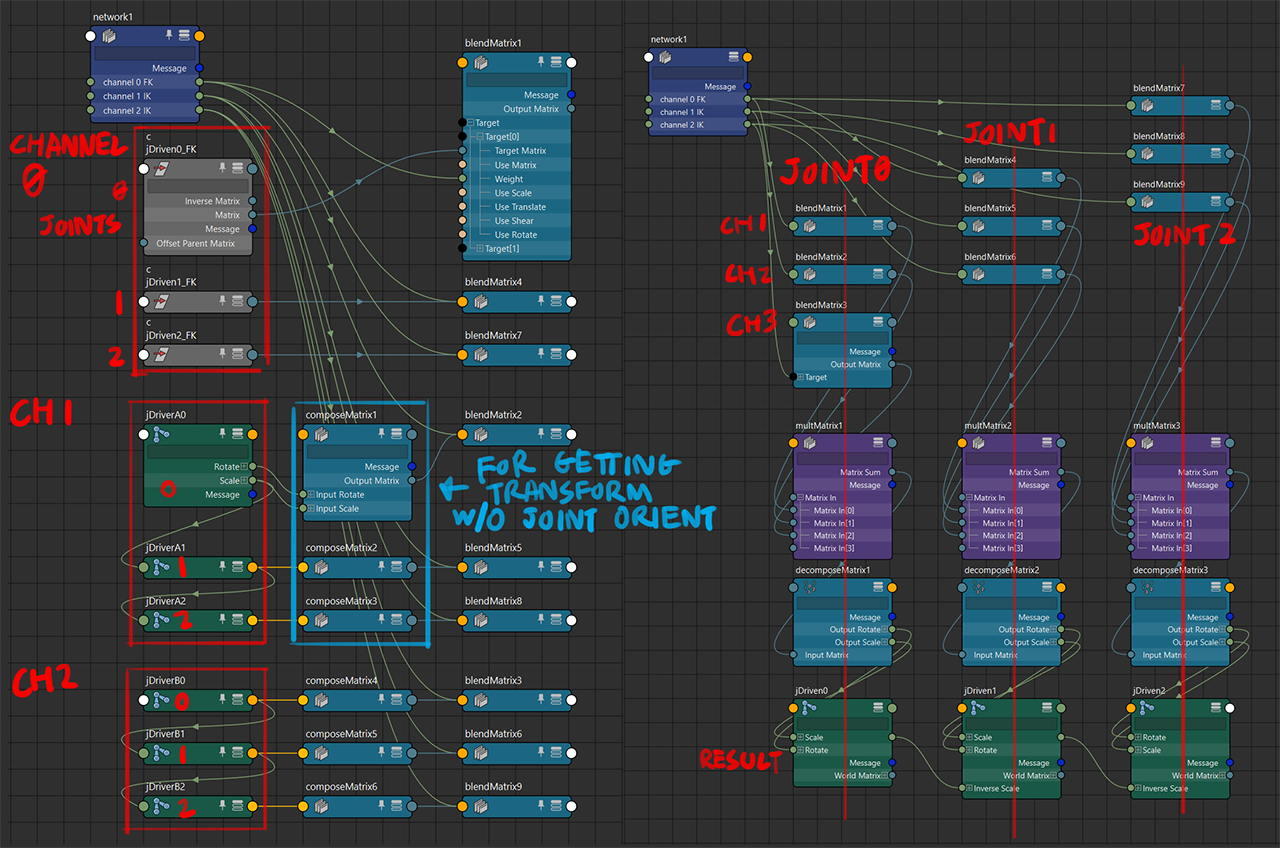
note 1: the inputMatrix of the blendMatrix nodes in this case is
identity
note 2: image demonstration is just for the rotation component, the quirks of the scale component is described above
this method makes multiple transform sets (channels) behaves like an volume fader row on an audio mixer, where each result’s weight can be adjusted independently of each other.
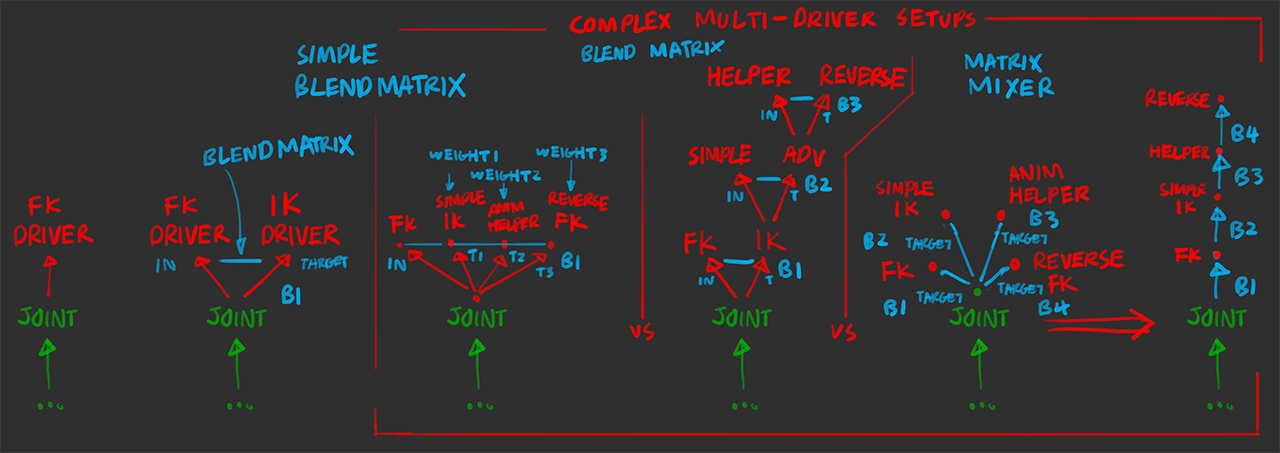
a simple FK/IK blend wouldn’t require a multiple-channel setup, however if the result transforms require weights above 1, the multiple-channel setup would be required, as the envelope attribute does not scale the inputMatrix transform up if it goes above 1
also if scaling the individual components of the transform is desired (i.e. weigh translate, rotate, scale separately), or if a blend between three or more transforms is desired, the mixer method is the only way to do so, because as mentioned in the intended use case above: the priority behaviour of the blendMatrix do not allow for mixing between targets directly, especially if the components are fed into different targetMatrix channels.
multiple blendMatrix nodes multiplied together
vs single blendMatrix chain of multiple matrices
⬇ open GIFs in a new tab for original size (1024px)
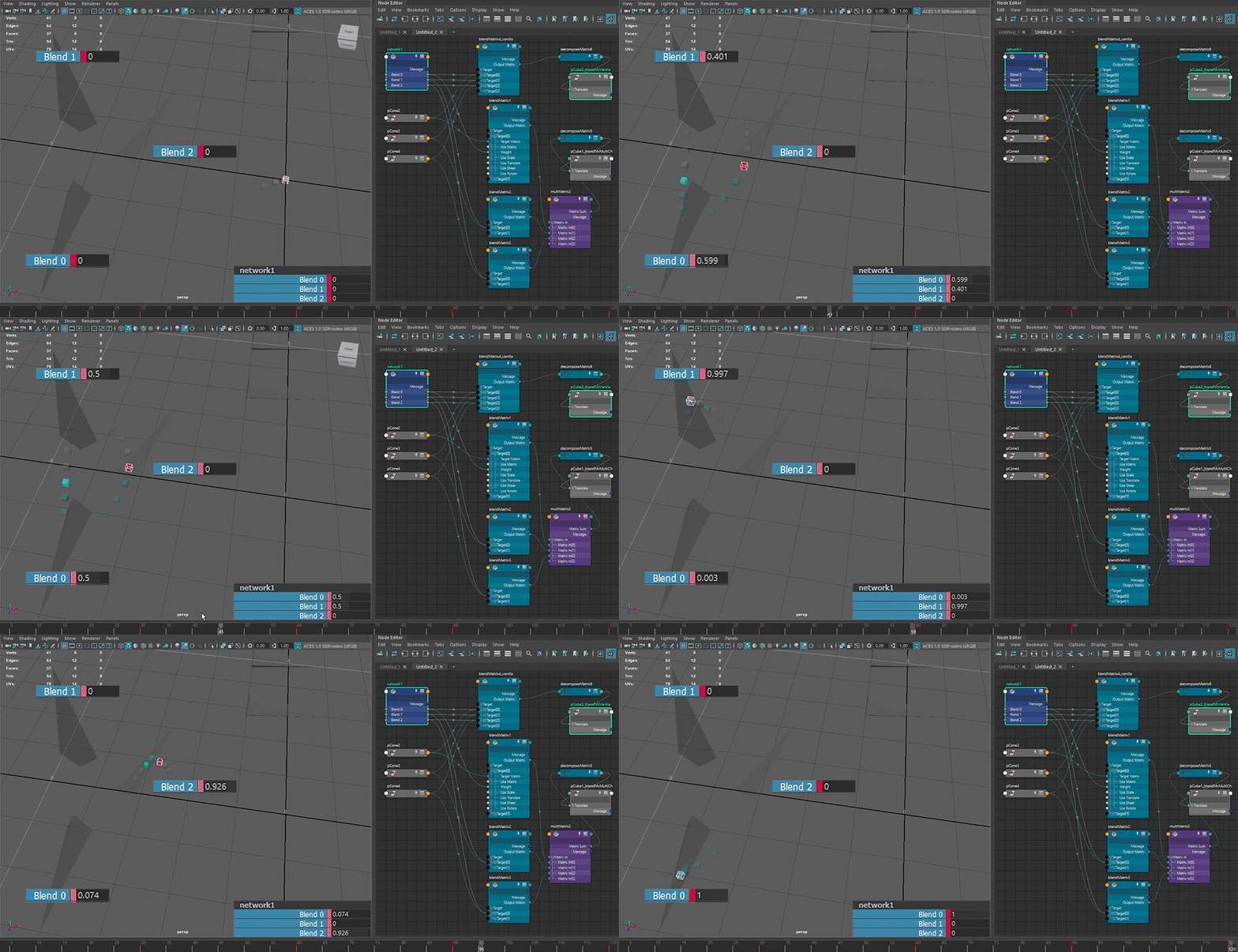
⬆ default hopping behaviour - translate component only
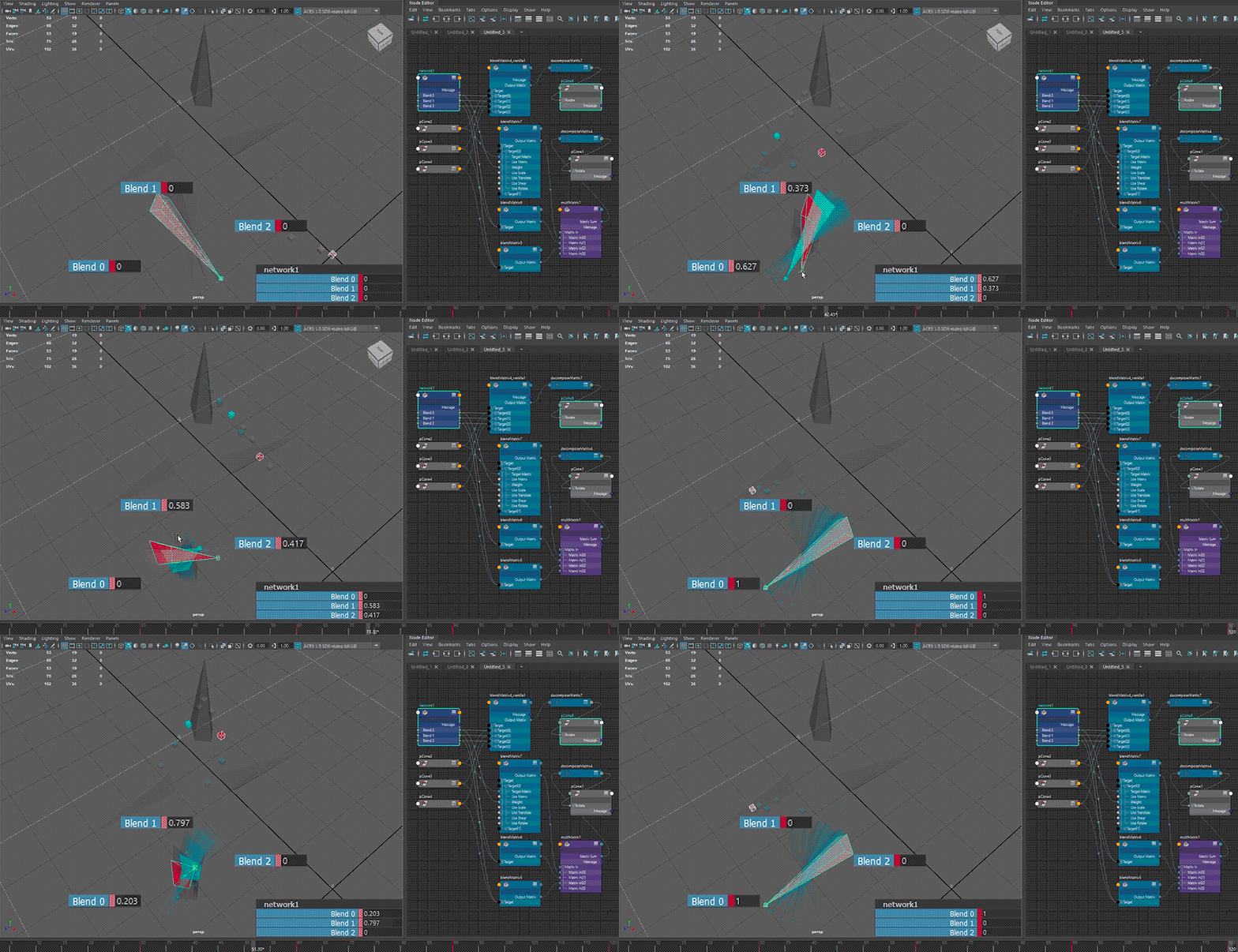
⬆ default hopping behaviour - rotate component only
red🟥 shape: single blendMatrix; teal🟦 shape: multiple blendMatrix
the blending behaviour from the intended use case 🟥 of
blendMatrix(i.e. all target matrices fall into a singleblendMatrixnode) does not seem to be consistent, especially on blends going backward from a later index to an earlier index ( (n)th to (n-2)th or earlier), exhibiting a hopping motion from blending to all-zero first
having multiple blends 🟦 for transform resizing reasons increases node counts, but allows for blending towards all-zero.
this also allows a quick scaling of the rotation component without contending with maya's rotation value interventions (the unitConversion node thing that happens when the environment is set in degrees if a floatAngle is connected to any attribute of dissimilar kinds).
scale and translate component scaling
blendMatrix vs multiplyDivide
and lerps vs scalars
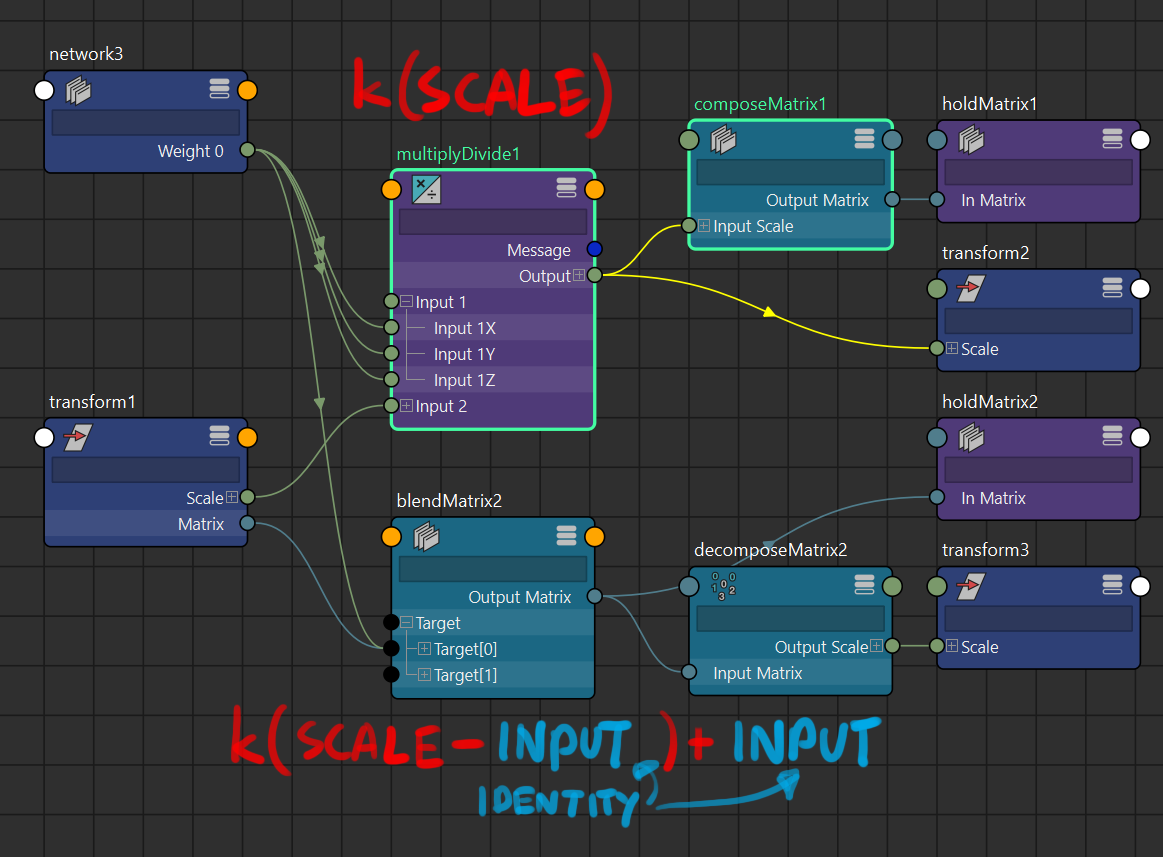
blendMatrix:
- scale is 1 at zero-weight (or equalling at a weight where inputMatrix.scale = targetMatrix.scale)
- scale introduces a flip in rotation if result scale goes below 0
multiplyDivide:
- scale is 0 at zero-weight (scalar is 0), making the result transform 0 and is unsuitable for mixing purposes as zero-weight would cause models or joints to disappear
blendMatrix vs passMatrix
(for transform resizing purposes)
passMatrix multiplies all the elements in the matrix by a scalar. unfortunately that also means the W component of the matrix is also scaled up. this negates the scalar operation, so resetting the W component to identity would be required if passMatrix is to be used.
blendMatrix vs wtAddMatrix
wtAddMatrix quirks(? or aspects making it unweildy to use?):
- the
rotationsnaps to the nearest weighted matrix when brought above all-zero, and does not blend to all-zero from any weight for some reason - the
translateandscalecomponents blend correctly towards all-zero, but note thatscalegoes to 0 at zero-weight due to its linear nature wtAddMatrixdoes not have the ability to pick transform components unlike inblendMatrixtargets
[Maya 2024] lerp node
while only affecting a single float attribute, three lerp nodes each could be a replacement for doing scale component adjustments to a transform without contending with rotation flips mentioned above.
if a vectorLerp (basically lerping between 3 floats at once) exists that’d be great (there’s blendColors, but the blend factor doesn’t go beyond 0-1)
misc notes
quatSlerpvsweightMatrix?quatSlerpis initialised with each inputs at[0,0,0,0], which causes problems when converting back to euler angles via quatToEuler. a zero quaternion[0,0,0,1]is expected for the lerp to work- the results of both are identical, and
weightMatrixtend to have a simpler setup without having to pre-adjust attributes